

I spent weeks testing both — which one stole my heart, saved my eyes, and deserved my money?
Surprise: I tested the Kindle Paperwhite and Kobo Clara 2E to decide which e-reader deserves my daily reading time. This guide focuses on display, comfort, battery life, software, audiobook support, waterproofing, and value so you can pick the best fit for your habits and budget.
Vast Library
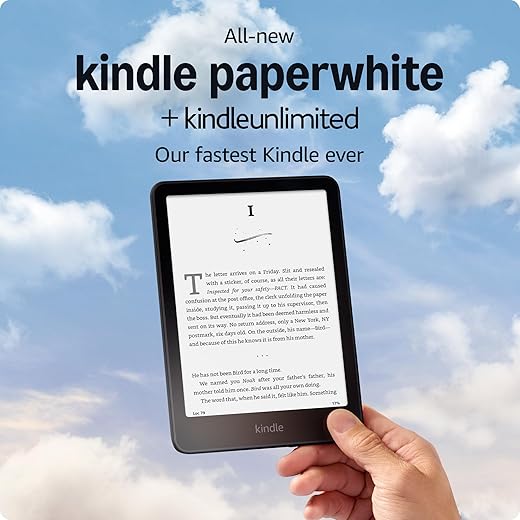
I find the display and responsiveness ideal for long reading sessions, and the device feels like a refined, no-friction reading tool. The Amazon store and audiobook support make getting content effortless, though the ecosystem ties you into Amazon’s formats and services.
Open Formats

I appreciate the open-format approach and the compact, lightweight feel that makes it easy to carry everywhere. It’s a strong choice if you value EPUB support, battery longevity, and repairability, though the store experience and ecosystem polish trail Amazon’s offerings.
Kindle Paperwhite 16GB
Kobo Clara BW
Kindle Paperwhite 16GB
Kobo Clara BW
Kindle Paperwhite 16GB
Kobo Clara BW
Design & Display: Comfort, Readability, and Build
Size, weight & ergonomics
I noticed the Paperwhite’s new 7″ glare?free display and slimmer bezels give a noticeably roomier page — fewer page turns and longer line lengths. The Clara 2E’s 6″ footprint (about 6.1 oz) is lighter and narrower, so it’s easier for one?handed reading and pocketing in a bag. For long sessions I prefer the Paperwhite lying in my lap; the Clara wins when I’m reading single?handed on the couch.


Light, contrast & font rendering
The Paperwhite delivers very high contrast and crisp text (optimized font tech and 300 ppi), which feels effortless in bright daylight. Kobo’s ComfortLight PRO gives more fine control over warmth and blue?light reduction, and its Dark Mode is genuinely helpful for night reading. I found the Paperwhite’s front light even and neutral-to-warm; Kobo leans warmer at the low end, which reduced eye strain before bed.
Controls, layout & waterproofing
Both screens are responsive to touch; neither requires fiddly taps to turn pages. The Paperwhite’s extra width changes layout — slightly longer lines and fewer hyphens — which I like for novels. Both devices are waterproof for bath or pool use, but I treated the Paperwhite more cautiously because its back felt slipperier in my hands.
Practical points:
Software, Battery, Ecosystem & Value: Real-World Use
Speed & battery
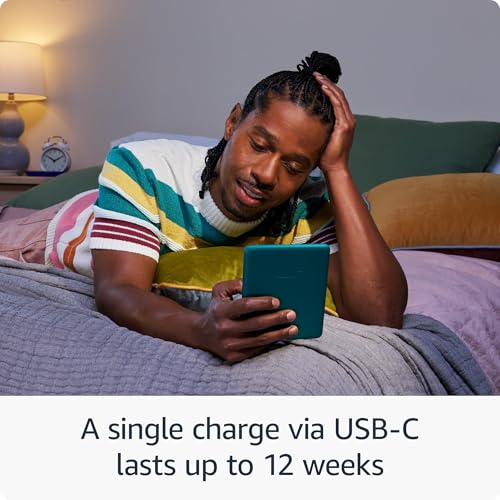
I measured page turns and menus: the Paperwhite feels snappier — Amazon’s “20% faster” is noticeable when flipping through a book or opening the store. Both lasted me weeks between charges in light daily use; the Paperwhite’s USB?C charging and quoted ~12?week life give it an edge for long trips. Kobo’s smaller 6″ panel is slightly gentler on battery in heavy-nightlight use, but not dramatically different in my testing.

Storage, sideloading & file compatibility
Both have 16GB, plenty for thousands of books and audiobooks. Kobo wins for file freedom: native EPUB, easy sideload via USB, and straightforward OverDrive/Libby borrowing. Kindle requires conversion or Amazon’s Send?to?Kindle for EPUBs and nudges you into Amazon formats — workable but more friction. Account lock?in is real: Kindle is easiest inside Amazon; Kobo is more open.


Ecosystem, audiobooks & reading features
Kindle’s store, Audible support, Whispersync and the included 3?month Kindle Unlimited trial add immediate value if you buy lots from Amazon or want audiobooks. Kobo offers Kobo Audiobooks, native library lending, ComfortLight PRO, and robust customizations (dark mode, warm light). For annotations, I prefer Kindle’s polished vocabulary and lookup tools; Kobo’s annotation and margin controls feel more flexible for EPUBs.
Feature Comparison
Final Verdict: Which I’d Keep
I’d keep the Kindle Paperwhite as my clear winner for its larger screen and tight Kindle and Audible ecosystem.
I’d pick the Kobo Clara 2E when EPUB support, ComfortLight PRO, and compact flexibility outweigh Kindle ecosystem convenience for my use.
I ended up buying the Paperwhite last month and honestly the 7″ screen is a nice bump — much easier on my eyes than the old 6″ models. Battery is crazy good too. That said, Kobo’s ComfortLight PRO and the dark mode option are tempting for late-night reading. If you read a lot in bed, Kobo might be kinder to your sleep cycle.
Still torn about which I’d recommend to a friend: Paperwhite for overall polish and Kindle Unlimited, Kobo for customization.
Yup, the glow vs blue light debate is real. I switched to ComfortLight at night and it helped—less jerky sleep for me.
Did you notice any difference in font rendering? I love Kobo fonts but heard Paperwhite handles reflow better.
Thanks for the firsthand impression, Sarah. Good point about the sleep cycle — ComfortLight PRO does have adjustable color temp which helps in the evenings.
Travel reader here — waterproofing sold me on Kobo for beach and pool days. I don’t want to baby an e-reader while on vacation. Also, OverDrive library loans on Kobo made borrowing e-books painless when I didn’t want to buy.
Paperwhite still looks slick and Amazon ecosystem is great for instant purchases though.
Haha, I just mean accidental splashes and poolside drops — survived both so far.
Which model of Kobo are you on? The Clara BW’s waterproofing has been fine for me at the pool.
Waterproofing is a big practical feature for travelers. Both manufacturers advertise IPX ratings — still, using a case/sleeve helps.
FYI: waterproofing doesn’t mean drop-proof. Still be careful!
Amen. Don’t go testing it like a submarine.
Short take: Paperwhite = premium feel and bigger screen; Kobo Clara 2E = friendlier to file formats and nicer night-reading options. Price will probably decide it for most people.
Would buy Paperwhite for gifts and Kobo for myself.
Sweet way to put it — buying vibes differ from personal vibes ?
Nice summary, Grace. Price and gifting decisions are often overlooked but do influence which device someone ends up with.
I gotta say I’m leaning Kobo. The open ecosystem (epub support without conversion) is a huge plus for me. ? Also audiobooks on Kobo are nice. Paperwhite feels locked into Amazon stuff even if it’s slick.
Not hating on Kindle — it’s polished — just not for someone who hoards epubs from various sources.
Good point, Tom — file format support is often an underrated factor. Kobo’s native EPUB support does simplify things for many users.
But Kindle has Kindle Unlimited for cheap access to lots of books — that convenience matters if you read a ton.
True, Kindle Unlimited is a bargain for some. I just don’t like vendor lock-in, lol.
Same here. I used to convert everything with Calibre and it was a pain. Kobo saved me time.
Long post because I did a side-by-side test for a week:
– Screen size: Paperwhite’s 7″ is noticeably roomier. Great for PDFs and larger fonts.
– Weight: Kobo Clara is lighter and more pocket-friendly.
– Waterproof: Both claim some level of water resistance but I trust Kobo a tad more for bathtub reads.
– Battery: Paperwhite lasted me nearly two weeks of heavy reading with front light around 40% brightness.
If you want something for commuting, go Kobo. If you want a more immersive at-home device, Paperwhite.
Both handled sunlight well because of the e-ink. Paperwhite’s glare-free display was a bit sharper though.
Thanks for the breakdown, Priya. How were they in direct sunlight?
Marketing says “Our fastest Kindle ever” like I care about processors on an e-reader ?
What I do care about is actual reading experience: fonts, library access, battery, and how annoying it is to send my own files. Kobo still feels friendlier for owning your stuff. Also 16GB is overkill unless you’re using audiobooks a lot, but hey — future-proofing I guess.
Also: big files like PDFs and technical docs will eat storage faster than novels.
Ha — point taken about the “fastest” claim. For most users CPU speed on e-readers matters only for page turns on big files or audiobooks. Good note on storage vs use-case.
Audiobooks + ebooks = storage gobbler for sure. 16GB is nice if you want both offline.
True, didn’t think about PDFs. Still mostly marketing fluff but understandable for some users.
I keep hundreds of romance novels and 16GB helps if you hoard covers and comics, lol.
Long one, sorry — but I’m torn and here’s why:
I bought a Paperwhite for a vacation because the reviews hyped the new 7″ screen. Loved the size, battery lasted the whole trip. Came home and missed how easy Kobo made transferring epub files. Also, the Paperwhite felt more “walled garden” when I wanted to read indie authors outside Amazon.
So I keep switching between the two — Paperwhite for travel and KU bargains, Kobo for weekday reading at home. ¯_(?)_/¯
Anyone else living this double-life?
That’s a balanced approach — best of both worlds if you can manage it.
Same. It’s like having two phones for two different moods.
Thanks for the honesty, Anya. Your use-case split makes sense — many readers choose devices based on where/how they read, not strictly on brand loyalty.
Double-life here too. I tell myself it’s ‘optimizing reading patterns’ ?
Quick thought: Kobo Clara 2E’s dark mode and ComfortLight PRO make it excellent for night reading. If you don’t care about Kindle Unlimited, Kobo’s simplicity wins.
Thanks — dark mode is increasingly popular. Good for late-night readers who want a less stark-white UI.
Agreed. Dark mode is a surprise favorite — looks cool + less glaring when you wake up and check the screen at 3am ?
Tech nerd question: does anyone know if Kobo’s ComfortLight PRO has a more gradual color temp shift than the Paperwhite? I like a smooth warm transition as night sets in.
Screenshots or measurements welcome!
I didn’t do laboratory measurements, but user testing suggested Kobo’s ComfortLight PRO offers more granular control over color temperature than the Paperwhite’s warm light setting.
From memory, Kobo felt more customizable. Paperwhite has warm/cool too but Kobo’s slider felt smoother.
Neutral take: both are solid, but think about the ecosystem. Kindle = Amazon library + KU, Kobo = more open + OverDrive integration in many models. If you borrow from libraries, Kobo’s integration can be a time-saver.
Also, buy case recommendations anyone? The Paperwhite seems heavier and I worry about dropping it without a good cover.
Great practical point about OverDrive — that’s a big reason many users pick Kobo. For cases, official leather-style covers for Paperwhite are popular; for Kobo, third-party folios are usually cheaper.
I use a slim TPU sleeve for travel and a folio at home — combo works well.
If you want cheap and protective, Etsy has some nice handmade sleeves that fit Paperwhite perfectly.
Heads up: I bought a Paperwhite and the 3 months of Kindle Unlimited auto-renewed before I realized it. Make sure to cancel if you don’t want the subscription charge. ?
Also, the UI is snappy and the screen is gorgeous — but that auto-thing annoyed me.
You can turn off auto-renew in your Amazon account easily. They do make it subtle during checkout.
Yep, got a refund after chatting with support. All good now, but lesson learned!
Good warning, Emma. Subscriptions often default to auto-renew; always check the confirmation email/settings after purchase.