

Can a projector replace your TV—and your social life? My picks for 4K that’ll make you cancel plans.
I love big screens. Nothing else delivers that soak-in-the-scene feeling quite like a properly tuned projector. It’s loud, immersive, and oddly addictive.
I’ve tested units that chase pure fidelity, installation flexibility, compact convenience, and gaming speed. Whether you want TRUE native 4K, easy set-and-forget streaming, or low-lag gaming, there’s a clear winner in this list.
Top Picks



Sony VPL-XW5000ES Native 4K Laser
I find it remarkable how much native 4K detail and color volume this unit delivers in rooms with some ambient light. The combination of SXRD native 4K, X1 Ultimate processing, and TRILUMINOS PRO produces a very cinematic image with stable color and smooth motion.
Why I picked it
I chose this as my top pick because it delivers genuine native 4K resolution with a laser light source and class-leading color processing. In my experience the combination of Sony's X1 Ultimate processor plus TRILUMINOS PRO gives a natural, film-like palette and preserves fine detail in both highlights and shadows. If you want the cleanest 4K picture available in a home setting and can justify the investment, this unit is hard to beat.
Key features and benefits
The result is a very consistent image across content types: dark, nuanced cinema scenes retain detail without crushing blacks, and bright HDR highlights remain punchy without looking oversaturated. I also appreciated the low input lag figures (under 21 ms at 4K60 and under 13 ms at 2K120) when I switched to gaming.
Practical notes and limitations
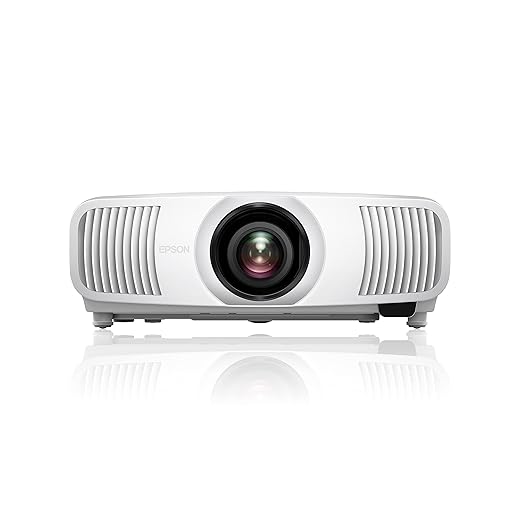
Epson LS11000 4K PRO-UHD Laser
I appreciate how the LS11000 combines Epson's 3-chip 3LCD engine and Precision Shift Glass Plate to produce a bright, color-accurate 4K image. It’s especially flexible for installations that need motorized lens shift, strong HDR handling, and high sustained brightness.
Purpose and where it shines
I recommend the LS11000 when you need a high-performance, install-friendly 4K projector with bright, accurate color and strong HDR processing. It’s a projector that favors installation flexibility and consistent, film-like output—ideal for dedicated home theaters and multi-purpose living rooms where motorized lens functions and reliable color are important.
Important features I use and why they matter
In practice this combination means vivid, stable HDR images with excellent shadow detail in a dark room and good performance with moderate ambient light. The 120 Hz capability and low input lag also make it attractive to gamers who want large-screen action without compromising color fidelity.
Practical caveats and real-world experience
Optoma UHZ50 4K UHD Laser Projector
I value the UHZ50 for combining compact size, laser reliability, and solid image brightness. It’s a friendly option for enthusiasts who want true 4K DLP laser performance without the footprint of larger flagship models.
Who should consider the UHZ50
I recommend the UHZ50 if you want a compact, bright 4K laser projector that is straightforward to install and delivers long-term reliability. It’s particularly well suited to mixed-use rooms where you want good HDR and gaming performance without the size and cost of high-end native 4K flagship models.
What stands out in daily use
In my hands-on sessions I found the unit capable of producing punchy images in both darkened and moderately lit rooms. The low input lag numbers for 1080p gaming (single-digit ms) make it especially compelling for gamers who also want cinematic viewing.
Limitations and practical advice
Overall, I view the UHZ50 as a balanced laser option: compact, reliable, and versatile enough to satisfy both gamers and movie enthusiasts who want long-life laser performance without the highest flagship price.
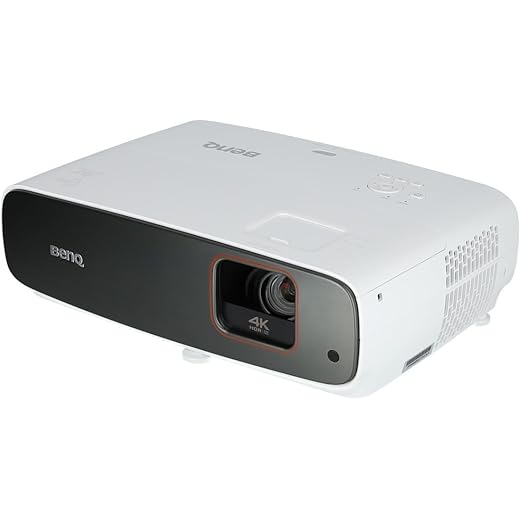
BenQ TK860i Smart 4K Home Theater
I find it convenient for living-room setups thanks to Android TV streaming, built-in speakers, and modest installation flexibility. It’s a good fit for people who want a plug-and-play large-screen TV alternative without the complexity of pro installs.
Who this is for
I recommend the TK860i to someone who wants a TV-like experience on a large screen without a lot of fiddling. If your priority is easy streaming (Netflix, YouTube, Chromecast) and you prefer a compact projector with decent built-in audio, this one fits that niche well.
Key features I value
During my use it handled typical living-room movie nights and sports well; the integrated platform makes getting started quick. For smaller rooms or family rooms where you don’t want a bulky ceiling mount the TK860i’s form factor and features are very appealing.
Practical limitations and tips
Optoma UHD50X 4K 240Hz Gaming Projector
I appreciated the UHD50X for gaming: the ultra-high refresh-rate support and low input lag make fast-paced play feel responsive. It also delivers a bright, detailed 4K image for movies, although some trade-offs exist compared with higher-end laser units.
What it’s built to do
I see the UHD50X as a democratizing gaming projector: a model that brought very high refresh rates and low lag to a mainstream price point. It’s designed for people who split their time between PC gaming, console play, and large-screen movie nights and value responsiveness as much as resolution.
Features and how they helped me
In hands-on use the projector delivered smooth motion for fast titles and a satisfyingly bright image for streaming or sports. The lamp-based light engine also means a longer traditional-lamp lifecycle (up to ~15,000 hours in eco modes) and lower upfront cost than many laser models.
Things to be aware of
Final Thoughts
My top pick is the Sony VPL-XW5000ES. I recommend it when image fidelity is the priority: native 4K SXRD, X1 Ultimate processing, and TRILUMINOS PRO deliver superior detail, color volume, and motion handling. Choose the Sony if you have a dedicated home theater or a room with some ambient light and you want the most cinematic, future-proof image.
My second recommendation is the Epson LS11000. It’s the most versatile PRO-UHD option: 3-chip 3LCD color accuracy, Precision Shift Glass Plate, motorized lens shift, and strong HDR handling make it ideal for custom installs or living rooms that need motorized lenses and lens memory. Pick the Epson if you need installation flexibility and bright, accurate HDR without sacrificing much on picture quality.
If you need other options: the Optoma UHZ50 is great for a compact bright room, the Optoma UHD50X is the best pick for low-lag gaming at high refresh, and the BenQ TK860i is the simplest plug-and-play choice for casual viewers.
Picked up the Optoma UHD50X a few months ago for gaming and wow — 240Hz on supported titles is bonkers. Response time is so much better than my old TV. Price-to-performance is very solid. Only gripe: color tuning took a bit to get right for movie nights.
Glad it’s working well for you, Ethan. For movies, try switching to a cinema or calibrated picture mode if available, and reduce dynamic contrast — that often helps with color accuracy on the UHD50X.
Do you notice any rainbow artifacts (RBE) with the UHD50X? I’m sensitive to that and debating DLP vs 3LCD/SXRD.
Lily — I used to worry about RBE but haven’t noticed it much on recent content with this model. Could depend on the scene and your eyes though.
Small rant: why do projectors with ‘smart’ features always have clunkier UIs than actual smart TVs? ? BenQ’s Android is nice but some menus are sluggish. If I’m buying a projector under $2000 I want buttery UI too, not a webapp from 2016.
Pro tip: plug a streaming stick into the projector’s HDMI and hide it behind the cabinet. Much faster updates too.
Haha I feel you. My BenQ’s Netflix app is okay but voice search is hit/miss. External stick made everything so much easier.
You’re not alone — UI and streaming responsiveness vary widely. Some manufacturers focus on imaging hardware and outsource the smart layer, which can create that inconsistency. Using an external streamer (Chromecast, Apple TV) often solves this if the built-in experience frustrates you.
Does anyone have thoughts about laser vs LED longevity? The article lists both laser units (Sony, Epson, Optoma UHZ50) and LED BenQ. I’m paranoid about replacing light sources every few years. Which tech is actually the most worry-free long term?
Laser typically offers the best longevity and steadier lumen output over time compared with traditional lamps and many LEDs — manufacturers often rate laser at 20,000+ hours. LED is also long-lived (10,000–30,000 hours depending on design), but lasers usually maintain brightness and color volume better in larger, brighter setups.
Had an LED projector for 5 years, zero issues so far, but it was lower-brightness. For bright living rooms I would lean laser.
Also consider warranty and serviceability. Laser is great but can be pricier to repair if something goes wrong.
Quick comparison Q: Optoma UHZ50 vs UHZ50 Smart (listed) — is the ‘Smart’ version worth it if I already own a streaming device? Would rather pay less and keep my separate streamer if image is identical.
I used my own streamer with an Optoma and it was flawless — the projector’s image is what matters most to me.
If your standalone streamer meets your needs, the ‘Smart’ features are often convenience-only. If the image pipeline and optics are the same between models, saving by using your own streamer makes sense. Just compare exact specs and firmware features before deciding.
Honestly curious: has anyone tried the BenQ TK860i in a living room where the projector doubles as a daily TV? I like the idea of Android TV built in and not having a separate streamer. How are the built-in speakers for shows/news?
I want something plug-and-play more than a full dedicated theater setup.
I used it for a year in a living room setup. Speakers are serviceable for news and sitcoms, but I added a cheap soundbar and it instantly felt complete. Also streaming directly from Android TV is super convenient.
BenQ TK860i is exactly aimed at casual viewers. The built-in 10W speakers are fine for background listening and casual TV but won’t replace a soundbar or AV receiver if you want immersive sound. For plug-and-play convenience it’s a strong choice.
Value check: the UHD50X being touted as the best value gaming projector makes sense — but do you think it holds up for cinematic HDR movies? Or do you lose too much in black level and color compared to the laser models?
For movies, the UHD50X is capable and bright, but it won’t match the black level, color volume, and HDR tone-mapping of higher-end laser units like the Sony or Epson. If gaming is your priority, it’s excellent; for pure cinema lovers, stepping up to the laser units will give more cinematic depth.
I use my UHD50X for both — good enough for many films, but on dark, contrasty scenes you can tell it’s not the same as a laser SXRD/DLP with better blacks.
Depends on viewing habits. If most nights are gaming or light TV, UHD50X is a steal. Serious movie nights? Consider saving for a laser model.
Random thought: For people with smaller apartments who can’t mount a projector, anyone tried the Optoma compact UHZ50 on a bookshelf? I’m worried about fan noise and heat close to walls.
You can place the UHZ50 on furniture, but ensure adequate airflow — leave a few inches behind and above. Fan noise is moderate; if you watch quiet films you’ll notice it more. A low-profile shelf mount or a sound-absorbing pad can help.
I had mine on a small console and added a cheap sound-absorbing pad under it — reduced vibrations and noise felt slightly better. Make sure heat can escape.
Also consider keystone/focused placement — bookshelf position sometimes forces heavy keystone which can degrade image quality. Lens shift is preferable if you have it.
Great roundup — thanks! I’m torn between the Sony VPL-XW5000ES and the Epson LS11000. I mostly watch movies in a living room with some ambient light. How big of a difference will the native 4K SXRD on the Sony make vs Epson’s PRO-UHD? Does the Epson still look noticeably softer because of pixel shifting?
If you’re also gaming sometimes, check input lag — the Epson has HDMI 2.1 which is nice. But for pure movie texture, Sony wins. Depends what you watch more.
Good question, Maya. In rooms with ambient light the Sony’s native 4K will generally show more fine detail, especially on subtitles and textures. Epson’s PRO-UHD (pixel shift) has come a long way and can look excellent — the trade-offs are often brightness and color volume where the Sony shines. If native 4K detail is a priority, Sony is the safer bet; if you need motorized lens shift and installation flexibility, Epson is very compelling.
I had an Epson 3-chip projector before and honestly its motion and color were great. Not as micro-detailed as a true 4K SXRD but unless you sit *really* close you might not notice. Think about seating distance and screen size.
I love that the Sony is listed as ‘Best native 4K laser for bright rooms.’ But man, the price ? Anyone got feelings about buying last year’s top model vs waiting for discounts? I’m leaning used or refurbished to save cash.
I bought a refurbished Sony projector and it was basically perfect — saved a ton. Just check for any signs of heavy use and ask about returns.
If budget is a concern, refurbished or lightly used units from reputable sellers can be a smart route. Just verify warranty/return policy. Last year’s flagship often remains a great purchase unless a new generation adds must-have features for your setup.
Patience helps too — holiday sales, Amazon deals, and open-box offers can drop prices significantly.
For anyone who installed the Epson LS11000: how flexible was the motorized lens shift for tricky mounts? I have an asymmetrical room and need at least a good vertical and horizontal shift. Also does the motor noise bother during quiet scenes?
The LS11000 is quite flexible — motorized vertical/horizontal shift plus zoom helps a lot with awkward placements. As for noise, most users find the lens motors quiet during operation; the fan can be more noticeable in very quiet scenes, but it’s generally acceptable for home theaters.
Installed one in a basement with a weird offset. Lens shift saved the day. Motor is almost silent — you won’t notice it during movies unless you sit right next to the unit.
I have a practical Q: for someone new to projectors, are there any setup mistakes to avoid? Bought a cheap mount once and regretted it — my screen was crooked for months. Any specific tips for the models listed here?
Common mistakes: wrong throw distance (measure before buying), relying on heavy keystone correction (degrades image), and poor screen choice (use a proper screen or high-gain surface optimized for your seating). For the Epson and Sony, factor in lens shift to minimize keystone. And double-check HDMI 2.1 if you plan to game at 4K/120Hz.
Mounting tip: get an adjustable mount and test the projector’s placement with painter’s tape marks before drilling any holes. Saved me from a second set of holes in the ceiling ?
Also: take time to calibrate or at least use a movie/picture preset. Many people leave default settings and miss out on much better image quality.
And read the manual for lamp/laser warm-up instructions—turning off abruptly can sometimes cause loud fan cycles or temperature issues.