

Comfort-first, compact design — long battery and quiet clicks for productive workdays
I used to feel my forearm grumble around mid?afternoon — the familiar ache that comes from flat, tired mousing. After a week with the Logitech Lift Vertical Ergonomic Mouse, that grumble got a lot quieter. This isn’t a magic cure, but the 57° vertical angle and textured thumb rest genuinely changed how my hand sits and how long I can work without fidgeting.
What sold me was the simple practicality: wireless Bluetooth or Logi Bolt receiver, months of single?AA battery life, and quiet clicks that don’t announce every scroll to the whole room. It’s clearly aimed at comfort and productivity (small/medium hands will love it); just don’t expect gamer features or a roomy palm grip if your hands are on the larger side.
Logitech Lift Vertical Ergonomic Mouse (Graphite)

I find it a thoughtfully designed vertical mouse that prioritizes comfort and practical everyday use. Its long battery life and reliable connectivity make it an easy pick for productivity setups, though it isn’t aimed at gamers or large-handed users.
Introduction
I often swap mice to see what actually makes a difference over a full workday, and this vertical Lift stood out for how naturally my wrist aligns while I use it. Logitech tuned the angle and contour for a handshake-like grip that reduces twisting without feeling gimmicky.
Design and hand fit
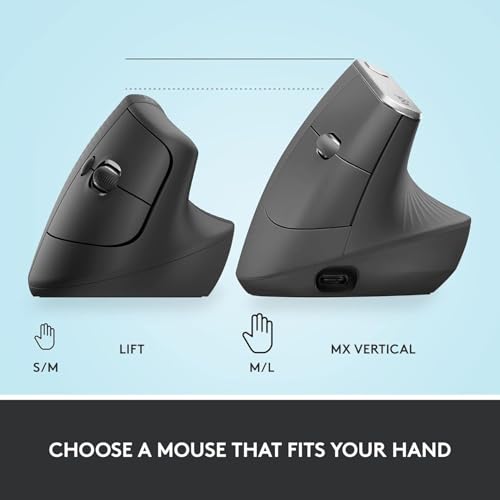
The Lift is sculpted for small to medium hands and is intentionally compact. The 57-degree tilt places the hand in a more neutral posture, and the textured grip helps keep the mouse stable without forcing a firm squeeze. I noticed less tension in my forearm after a few days of regular use.


What I appreciate about the built
Performance: tracking and controls
The sensor is responsive up to 4000 DPI and enough for most office tasks. Scrolling via the SmartWheel feels precise for both line-by-line and fast scrolling. I mapped frequently used shortcuts through Logitech’s Options+ utility to speed routine workflows.

Battery and connectivity
Quick spec comparison table
| Key attribute | What I observed |
|---|---|
| Angle | 57° ergonomic tilt for reduced pronation |
| Sensor | Up to 4000 DPI, reliable for productivity |
| Battery | Single AA, multi-month life in my use |
| Size fit | Best for small-to-medium hands |
Setup, software and customization
I used Logi Options+ to reassign the four programmable buttons for app-specific actions; the software is intuitive and lets you create profiles per application. For non-Windows/macOS platforms, basic functions work without extra drivers.
Who should consider this mouse?
I wouldn’t recommend it as a primary mouse for large-handed users or for competitive gaming, but as an ergonomic productivity mouse it checks almost every practical box I look for.
FAQ
I found that relief is often gradual — many users notice improved comfort within days, but it can take a week or two for muscle and nerve adaptation. Pairing the mouse with a proper wrist rest and taking regular breaks speeds up the benefit.
Logitech makes both right- and left-handed versions, but the specific model reviewed here is right-handed. If you’re left-handed, I recommend buying the left-handed variant to get the same ergonomic benefits.
Very easy — I toggled among a laptop, desktop (via Logi Bolt), and tablet using the Easy-Switch button. Pairing was straightforward and switching took a single click.
No — basic pointer and click functions work out of the box on most platforms. I used Logi Options+ to customize buttons and gestures, which added noticeable workflow gains for me on Windows and macOS.
Logitech rates it for about two years on a single AA under typical use. In my day-to-day testing it lasted several months without any loss of responsiveness; your mileage will vary by usage intensity and connection mode.
I don’t recommend it as a primary gaming mouse. It’s tuned for comfort and productivity rather than ultra-low latency or rapid-fire button layouts that competitive gaming demands.
Yes — I paired it with an iPad and a Chromebook. Basic functions work on iPadOS and Chrome OS, though advanced customization may be limited compared to Windows/macOS when you don’t install Logi Options+.
I’d measure your hand from the wrist crease to the tip of your middle finger: if you’re in the small-to-medium range, the Lift feels natural; larger hands may prefer a bigger vertical model (like the MX Vertical) for fuller palm support.
This mouse has been great for my open-plan office setup — super quiet and doesn’t distract coworkers. A tiny nit: I wish the scroll wheel had a bit more resistance.
Overall very happy with the comfort and minimal design. Also, the graphite matches my laptop so bonus points for aesthetics.
PS: shipping was fast and packaging felt eco-friendly. Slight typo on their manual though, lol.
Which seller did you get it from? Amazon? Wondering about shipping times to the UK.
Agree about the packaging — minimal and tidy. The manual had a funny line that made me chuckle too.
Thanks Leah — noise and aesthetics were part of the expert verdict. Good call on the scroll wheel resistance; we’ve heard that a few times.
Price is $69.99 — is it worth that much over a basic mouse? I work from home and use my computer ~8 hours a day.
I’m tempted because of my wrist, but I’m not sure if the size will suit me long-term.
Try to find a local shop where you can try the angle/size. If that’s not possible, Amazon return policy is usually flexible.
If you’re doing 8 hours daily and have wrist discomfort, it’s likely worth the investment. The Lift is designed for prolonged desk work and quiet offices.
For me yes — my wrist pain decreased and I feel more productive. But if you have very large hands, test the size first.
If budget’s a concern, consider cheaper verticals, but they may lack the same build and quiet clicks.
Love the quiet clicks ? — my partner sleeps in the next room and doesn’t get annoyed anymore when I finish late. Also the graphite color looks sleek. tiny typo below lol
Only downside I’ve found is the back button placement; I keep hitting it by accident sometimes ?
Glad to hear the quiet clicks are making a difference! Accidental back clicks are a common complaint — you can remap the button in Logitech Options to reduce that annoyance.
I remapped mine to ‘forward’ instead of back and it helped a lot. Took a day to get used to, but worth it.
It should sync if you’re logged into Logitech with the same account and using the Options+ app, but I had inconsistent results between my MacBook and Windows PC.
Haha same, my browser history was chaos until I fixed it. Good tip about remapping.
Question: does remapping carry over between macOS and Windows? Anyone tried cross-platform? ?
Not bad for desk use, but PSA: this is NOT a gaming mouse. If you try to crank DPI or use it for fast FPS, you’ll be sad.
Also, for anyone expecting a bulky ergonomic spaceship — it’s fairly subtle. I like that, but some might not feel it’s ‘ergonomic enough’.
Agreed. I bought it thinking I could use it for both work and light gaming; left my aim feeling like a toddler’s first time ?. Stick with it for work.
Correct — we gave it an 8.8 mainly because it’s tailored to productivity, not gaming. DPI and button customization are limited compared with gaming mice.
I compared the Lift to a couple of other vertical mice in the same price range.
What stood out was how quiet it is — the click noise is actually pleasant. However, if you have large hands, the angle and size could feel cramped. Also the scroll wheel is fine but doesn’t feel premium.
Good mid-range option but not perfect for everyone.
Large-hand users here — confirmed. I ended up returning it for a bigger vertical from another brand, but if you have small/medium hands it’s pretty great.
Did you try the lift with macOS? I’m curious if any gestures are limited compared to Windows.
Thanks, Sofia. The quiet clicks and mid-range positioning are exactly what we tried to highlight. Your point about the scroll wheel is noted — it’s functional rather than luxurious.
I used it on Mac and iPadOS — basic functions work fine, but some customizations need Logitech Options which had limited features on iPad.
Short impressions after unboxing:
– Pairing via USB receiver was instant.
– Bluetooth works with two devices, which is handy.
– Build quality feels solid, but the palm slope is shallower than I expected.
If you’re switching from a flat mouse, expect an adaptation period of a few days.
Overall: efficient and comfortable for weekday work, not for marathon gaming sessions.
Good notes, Daniel. The dual-device pairing is a useful feature for those who jump between machines a lot.
Appreciate the adaptation warning — took me about 3 days to stop misclicking everything. After that it’s smooth sailing.
Battery life claim of 24 months sounds wild — anyone actually getting that? I’m skeptical unless you only use it a couple hours a day.
I’ve had it on Bluetooth full-time and I’m still within a year with no battery warning. So yeah, depends on usage.
The 24-month figure comes from Logitech under typical office use. Real-world results vary — heavy users or frequent Bluetooth use will see shorter life.
I’ve had mine about 8 months with moderate use and it’s barely dipped. So I think 24 months is reachable for light-to-moderate users.
I’ve been using the Logitech Lift for about two weeks after switching from a cheap vertical mouse.
Pros: my wrist pain has actually eased up, the quiet clicks are great for shared offices, and pairing with both my laptop (Bluetooth) and desktop (USB receiver) was painless.
Cons: I’m not sure about the thumb rest for longer sessions — it can feel a bit small after 6+ hours.
Would recommend for office work and general browsing. Worth trying if you want something low-risk and comfortable.
Good to hear about the pain reduction! I was worried the small size would be a dealbreaker. How tall are your hands? I’m on the fence because I have bigger palms.
Same boat as you, Ethan — I have medium hands and it fits nicely. If you have big hands though, try one in-store if possible before buying.
Thanks for the detailed rundown, Maya — really helpful. The thumb rest sizing is a common point; the Lift is aimed more at medium hands, so that matches what you’ve noticed.
Lefty here, and the fact this is a right-hand-only design is frankly tragic. Logitech, where’s the left-handed love? ????
Good for right-handers though — comfortable and low-profile. Just ignoring half of us as usual haha.
I’ve seen some left-handed alternatives from smaller brands, but they often compromise on build quality. Fingers crossed for Logitech to release a left version.
You’re not alone — we mentioned the right-hand design in the review. Hope Logitech expands the line to include left-handed variants.