

I put the Blue Yeti and Shure MV7 head-to-head — which one actually makes my live stream sound like a million-dollar podcast?
I compare the Blue Yeti and Shure MV7+ for streaming. After hands-on testing in OBS and live Discord sessions, I evaluate sound, features, and value to determine which mic suits streamers best and recommend one based on workflow and budget.
Pattern Flexibility

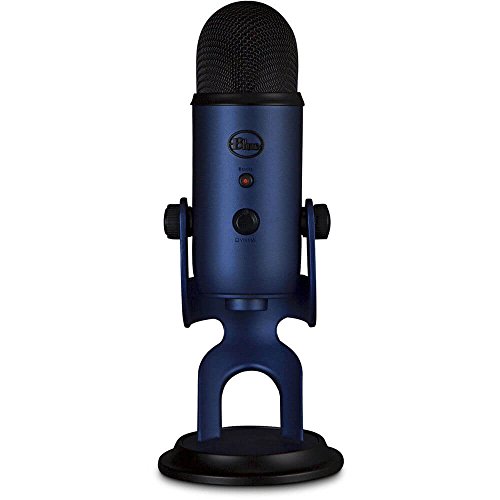
I find this microphone to be an excellent all-in-one USB option for creators who want easy setup and multiple pickup patterns. It delivers clear, broadcast-style sound for streaming and podcasting, though it benefits from a treated room or accessories to manage ambient noise.
Broadcast Ready

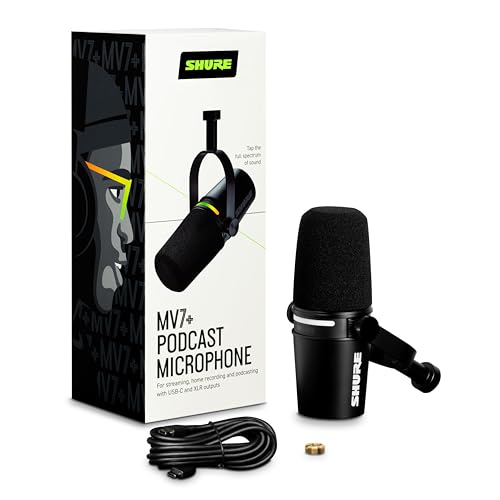
I appreciate the MV7+ for its focused voice quality and pro-grade connectivity that scales from USB streaming to XLR studio setups. Its DSP features and real-time denoising make it easy to get broadcast-ready audio even in imperfect rooms, though it is a pricier, more single-minded option.
Blue Yeti
Shure MV7+
Blue Yeti
Shure MV7+
Blue Yeti
Shure MV7+
Sound Performance & Live Testing — Which Mic Captures Your Voice Best?
How I tested
I ran controlled recordings and live-stream sessions in both a treated booth and an untreated bedroom. I recorded at 6″, 12″, and 24″ distances with aggressive and soft vocal styles, measured plosive and sibilance handling, and ran game-audio + co-host + Discord loopback streams to judge real-world behavior. I checked Yeti across all four polar patterns and tested the MV7+ using USB and XLR with and without onboard DSP (Auto Level, Denoiser, Digital Pop Filter).
Blue Yeti — condenser, flexible patterns
The Yeti delivered a fuller high end and more detail up close, but its tri-capsule condenser picked up room ambiance and keyboard/game noise in the untreated room. Cardioid was best for single-voice streams; stereo and omni shone for multi-person or ASMR. USB is truly plug-and-play; Blue VO!CE helps, but DSP sometimes sounded synthetic at extreme settings.


Shure MV7+ — dynamic, focused, broadcast-ready
The MV7+’s dynamic capsule stayed tight on-voice, rejecting background noise and minimizing plosives with the digital popper. Auto Level Mode and Denoiser kept levels consistent in live runs; XLR into an interface gave the cleanest, lowest-latency results. Onboard DSP is transparent at moderate settings; heavy compression introduced slight artifacts.

Features, Usability & Value — Setup, Controls, and Streaming Workflow
What I compared
I compared physical controls, connectivity, build, software support, and long-term value to see which mic fits a streamer’s workflow best.
Physical controls & connectivity
The Blue Yeti is plug-and-play USB with onboard gain, instant mute, headphone jack, and four pickup patterns that make quick setup trivial for desktop streamers. It’s heavier but feels solid for a desktop stand.

The Shure MV7+ adds USB-C and true XLR outputs, a customizable LED touch panel (mute/level), Auto Level Mode, digital pop filter, denoiser, reverb effects, and OBS certification — aimed at creators who want studio flexibility and live leveling without fiddling.


Software, OBS & stability
I used Shure’s MOTIV/Mix app and found real-time DSP (Auto Level, Denoiser) useful for live streams; OBS integration is seamless. The Yeti relies on Logitech G HUB/Blue VO!CE presets but lacks a dedicated, mic-specific app ecosystem — still stable and truly plug-and-play. Firmware updates for both were straightforward; MV7+ occasionally required app updates to unlock new DSP.
Mounting, durability & cost
MV7+’s metal build and XLR path future-proof upgrades (interface, mixer). Yeti is lower-cost up front (~$97) but limited to USB workflows.
Practical setup tips & presets
ROI: Buy Yeti for budget simplicity; choose MV7+ if you want pro connectivity and a clear upgrade path.
Feature Comparison
Final Verdict: Best Mic for Streaming
I choose the Shure MV7+ as winner for live streaming.
Pick Blue Yeti for simple plug-and-play use and lower price.
Podcasting question: how are these at rejecting background noise like AC and keyboard clacks? I’m mainly doing interview-style podcasts with one host in a small home office.
Anyone with real-world experience? I’m leaning MV7 but want to hear more about mechanical keyboard noise — does cardioid on Yeti help enough?
I had a loud AC and the MV7 reduced it significantly. Keyboard still needs a bit of mitigation (dampen with a mat, move mic closer, change switch type).
For AC and distant noise, MV7 (dynamic) generally rejects it better than the Yeti (condenser). Cardioid on the Yeti helps but condensers are more sensitive to highs (clacks). If you use a static mic position and a boom, both can be made to work — but MV7 is simpler out of the box.
Put the mic slightly off-axis from the keyboard and that helps a lot. Also try soft landing o-rings on your keys.
Quick note from someone who owned both:
– Yeti: gorgeous mids, bright, picks up everything (my cat walking in the other room became a feature ?)
– MV7: tighter, warmer, way less background noise
If you record at home around other people, go MV7. If you want raw flexibility and multi-patterns for interviews/roundtables, Yeti.
Honestly, I regret not buying a small boom arm with the Yeti — it’s heavy and needs support.
Same! Bought the boom arm later. The Yeti looks cool on my desk but the MV7 was better for late-night recording (neighbors + AC noise).
Great summary, Sophie. We actually mention the weight and mounting considerations in the article — Yeti often needs a stronger stand or shock mount adapter. MV7 sits nicely on a boom or a desk stand.
Also, cat endorsed — that’s a 5-star review in my house ?
FYI, you can buy a weighted desktop stand for Yeti which helps a lot if boom arm isn’t possible.
I bought the Blue Yeti because it was literally blue and matches my room ?
Not the most technical reason but it’s a decent mic. Friends say I sound like a podcast host now. Yeti for looks + convenience, MV7 for actual sound quality from what I hear.
Same aesthetic energy here. I have a pink mic stand. Sound > fashion? Maybe both ?
Can’t blame you for going with the aesthetic — Midnight Blue is a solid color. Just watch mounting and proximity effects with the Yeti.
Quick technical Q: anyone notice the headphone monitoring latency differences? I’m sensitive to delays while gaming/streaming.
Also is the MV7’s USB-C a real benefit vs the Yeti’s older USB?
MV7 generally has very low monitoring latency, especially when using direct monitoring. USB-C itself is mostly about convenience and a more modern connector — audio quality comes from the internal circuitry. Yeti’s USB is fine but MV7’s USB-C feels more future-proof.
I stream FPS and MV7 monitoring delay was negligible for me. Yeti had slightly more latency in one of my setups, but that can depend on drivers and sample rates.
Short and sweet: MV7 feels built like a tank, Yeti feels ‘classic’ and pretty. Performance-wise MV7 for vocals, Yeti for podcasting with multiple people. No dramatic fanboi energy here — both are solid choices depending on need.
Agree. Also, the Yeti’s finish scratches easier if you fidget with it a lot (speaking from experience).
That’s the TL;DR a lot of readers get to. If you want, check our section on durability — we ran a basic drop/knock test and MV7 handled it better.
Long ramble incoming — hope it’s useful:
I originally bought the Yeti because it was on sale and I wanted something plug-and-play for streaming. It sounded fine, but every time a car went by or someone downstairs walked it ruined a take. I switched to the MV7 after watching a few vids and omg the difference.
Pros of MV7: less room noise, Auto Level is actually helpful, build feels premium.
Cons: lacks the funky patterns of the Yeti and the Yeti’s condenser sound is “airier” which some viewers love.
For OBS users: MV7 being OBS certified removes a lot of guesswork — latency was negligible for me. That said, if you love the Yeti’s multi-patterns, you can still make it work with acoustic panels.
Curious — did you notice any difference between MV7 USB and XLR in terms of clarity? I’ve read mixed takes.
This is exactly my situation. Bought foam panels and it helped the Yeti a ton. But if you’re in an apartment, MV7 is probably the less stressful route.
I used MV7 USB for a year, then XLR into a Scarlett 2i2 and the difference was subtle but worth it for music/podcast work.
Sam: XLR + good preamp/interface will give the warmest, cleanest signal and slightly better headroom. USB is excellent for convenience and still great quality.
Nice write-up, Emily. We included a section about OBS latency and monitoring — MV7’s direct monitoring is lower latency than most USB setups in our tests, but make sure your sampling rate matches your DAW/OBS settings.
I went back and forth on this before buying — ended up with the Shure MV7 and honestly, it cleaned up my vocal presence way more than the Yeti did in my small room.
That said, the Blue Yeti still wins for ease-of-use and the multiple pattern options are nice if you ever want to record friends or do a group podcast. Yeti = plug-and-play charm, MV7 = more… purposeful.
Also worth noting: MV7’s USB-C/XLR flexibility is a huge plus if you plan to upgrade to an audio interface later.
Glad that helped, Michael — same takeaway from our tests. If your room is untreated, MV7’s dynamic capsule tends to reject more room noise than the Yeti condenser. If anyone wants, I can post the EQ settings we used for the MV7 in our sample clips.
Yep, MV7 Auto Level mode is a lifesaver for me when I move around while streaming. If you’re ever unsure, try XLR for even better noise rejection.
I disagree a bit — my Yeti on cardioid sounds great and was cheaper. Pop filter + a little EQ fixed the ‘room’ problem for me. But yeah, room treatment helps lol.
Money talk: Is the MV7 worth the premium over the Yeti? I stream casually and don’t plan on upgrading gear soon. I like the idea of future-proofing but im on a budget.
Would love a vote: keep it cheap with Yeti or invest in MV7 + XLR later?
If you can spare an extra 100-ish, MV7 will feel more ‘done’ for streaming. Otherwise Yeti + good setup is fine.
I started with Yeti, then felt ‘ready’ and sold it to buy MV7 — no regrets but that’s me being indecisive ?
If you stream casually and budget is tight, the Yeti is a great entry mic — very versatile. MV7 is worth it if you expect to record regularly, need better noise rejection, or plan to go XLR in the future. Think of MV7 as more of an investment.
Also check refurbished/used MV7s — you can save a chunk and still get warranty in many cases.
Long review from a longtime streamer:
I used a Blue Yeti for 3 years across podcasts and casual streams. It made me sound ‘bright’ and gave me presence, but it also picked up everything—dogs, appliances, street noise. Switched to the MV7 last year and my vocal clarity increased without adding harshness.
I use MV7 in USB mode with minor EQ: -1.5 dB around 2.5k, +2 dB at 100 Hz for warmth, and a mild high-pass at 80 Hz. Auto Level helps when I get excited and shout into the mic (sorry chat). The Yeti still has that classic look and flexibility, but for solo streaming/podcasting the MV7 is a more forgiving mic.
Pro tip: invest in a good pop filter and position the mic slightly off-axis for plosive control.
That EQ made my life better — tried it last night and chat said I sounded ‘fuller’ lol.
Do you use USB or XLR with those EQ settings? Wondering if I should jump to an interface.
Appreciate the detailed EQ settings, Grace — that will help a lot of readers. We used a similar curve in our sample tracks.
Marcus: the EQ you mentioned works well from USB too. XLR + a quality preamp/interface gives more headroom and slightly cleaner results, but USB is good enough for most streamers.
Love the Auto Level tip — very useful for live streams where you can’t re-record. Thanks!