
Why I Built a Troubleshooting Flowchart for Smart Thermostat Compatibility
I got fed up with confusing wiring, missing C?wires, odd HVAC types, and flaky Wi?Fi.
I created a clear decision tree that saved time and mistakes.
The guide walks me through assessing systems and wiring, matching features, solving C?wire and power issues, installation best practices, and real troubleshooting paths — plus when to call a pro.
This flowchart really works well.
Start Here: Assessing My HVAC System and Wiring
Identify my HVAC type
I first confirm whether it’s forced-air, heat pump, boiler (hydronic), or a multi-stage system. I once misread an O/B wire on a heat pump and bought the wrong thermostat — lesson learned: label and function matter more than appearance.
Document and decode wiring
I photograph the thermostat base and the furnace/air handler control board, then decode R, C, W, Y, G, O/B, Aux/E, and any zone or sensor wires. I check for a C?wire by testing R-to?C with a multimeter (expect ~24VAC). If unsure, I power off and trace the bundle to the transformer.
Quick checklist & red flags
- Photo of both ends
- Multimeter R–C reading
- Note multi-transformer or zone dampers
- Line-voltage or proprietary control panels
- VRF/ductless with their own controllers
- Multiple R’s from different transformers
Ecobee’s PEK or Google Nest compatibility quirks are examples I watch for. Next, I match these findings to thermostat features to choose the right device.
Interpreting Compatibility: Matching Thermostat Features to My System Needs
Map features to equipment
I translate my wiring list into required features: single vs. multi-stage heat/cool, heat pump with O/B and Aux, boiler call-for-heat, and any humidifier/dehumidifier or zoning panel. When I installed a Nest on a two-stage heat pump, I learned the hard way that not all “smart” models handle Aux staging the same—so I target thermostats that explicitly list my equipment.
Verify with manufacturer and community
I run each candidate through the maker’s compatibility tool, then cross-check forums (Reddit, HVAC-Talk) for edge cases like multi-transformer systems or proprietary HVAC controllers.
Trade-offs I consider
I prioritize basic, rock-solid compatibility first; advanced features come second unless they solve a real comfort problem in my home.
C-Wire Solutions and Power Issues I Use in Real Installs
Quick fixes I deploy
I choose one of four reliable fixes: run a new C-wire, repurpose an unused conductor, fit a local 24VAC transformer at the furnace, or install a thermostat power kit. I’ve run new conductors through attic chase runs for older homes and used the spare blue wire in a condo to avoid wall damage.
How I test and what I watch for
I check R-to-C with a multimeter (?24VAC) and re-measure under load—voltage sag >2–3V signals a weak supply. Symptoms that pushed me to add a C: random reboots, short Wi?Fi sessions, blank screen after a call-for-heat, or relay chatter. I also confirm the furnace transformer VA rating (typically 20–40VA); low VA equals unstable smart-thermostat behavior.
DIY pitfalls I avoid
Installation Best Practices: Tools, Sequence, and Safety Steps I Follow
Tools I bring
I never show up without:
My step-by-step sequence
I cut power at the breaker, verify with the non-contact tester, then photograph the old stat and wiring from multiple angles. I label each conductor with tape + number, open the manufacturer’s app (ecobee or Nest) and pre-select system type before changing plates—this avoids misconfiguring heat pump vs. conventional modes.
Mounting and wiring tips
For uneven plaster I use a 1/4″ plastic spacer behind the backplate and longer screws for firm anchors. I secure excess wire length into the wall cavity, not under the terminal screw, and strain-relief the cable with cable clamps.
Control-board switches and power-up check
I set DIP switches/jumpers per the furnace schematic, return power, then watch for correct fan/heat/cool responses and 24VAC stability with the meter. If something misbehaves, I flip the breaker off, restore original wiring photos, and revert to the old stat—saves headaches and service calls.
Using the Flowchart: Real Troubleshooting Paths and When I Call a Pro
Thermostat powers on but won’t call for heat
I first confirm thermostat wiring (R/W/C) and mode. Quick tests: measure 24VAC between R and W, and try a manual call-for-heat in the stat menu. Fixes in order:
System only runs the fan
I check whether G is stuck or relay is welded. Tests: energize G from stat, listen at air handler; use meter to see if G is being driven when heat/cool is requested. Fixes:
Wi?Fi pairing failures
Decision points: 2.4GHz vs 5GHz, SSID/password, AP isolation. Quick tests: move stat closer, try phone hotspot, factory-reset, update router firmware. Fixes: remove special characters in SSID, disable client isolation, use 2.4GHz or extender.
Multi?stage misbehavior
I test each stage terminal (Y1/Y2, W1/W2) individually and watch equipment response. Fixes: correct stage settings in thermostat, set delays, or re-label heat/cool stages.
When I call a pro
I escalate when I find:
With those rules I know when to stop and call the pro—see my final takeaways next.
Final Takeaways and My Quick Reference Tips
I recap key checkpoints: verify system type, test power first, photograph wiring, confirm C?wire, match features. I always prioritize safety.
Quick checklist I use before any install: 1) power off and test, 2) photo wires, 3) confirm compatibility, 4) plan C?wire or power adapter, 5) call a pro for proprietary or high?voltage systems.
Related
Share : facebook.com twitter.com linkedin.com
Helpful article, but I got confused on wiring color assumptions. My old install had green and blue swapped and the flowchart’s examples made me hesitate. Maybe include a stronger disclaimer: don’t assume color = function, always test.
Also, while the C-Wire section is thorough, it could use a quick decision table: if X then Y (PEK vs adapter vs run new wire). I left the article three times to cross-check other sources lol.
If you’d like, upload a photo of your thermostat wire bundle and I can help you map the colors to terminals — many readers have found that useful.
Yup, I once had a red wire tied into a separate subpanel. Testing saved me from a bad short.
@Hannah wow that’s scary. I’ll definitely double-test next time.
Totally agree, Mark. I’ll revise to emphasize ‘never assume color’ and add a clear decision table for C-wire options. Thanks for the candid feedback — cross-checking is smart.
Huge fan of the flowchart — I actually used it last weekend when swapping an old Nest for an ecobee Smart Thermostat Premium. The step-by-step wiring checklist saved me from guessing at the C-wire situation.
I initially tried the ecobee PEK but my system still needed a proper C-wire, so I ran an 18/5 10-foot cable (cheap and easy) and it worked like a charm. Author’s tip about testing for a constant 24V before installing? Lifesaver.
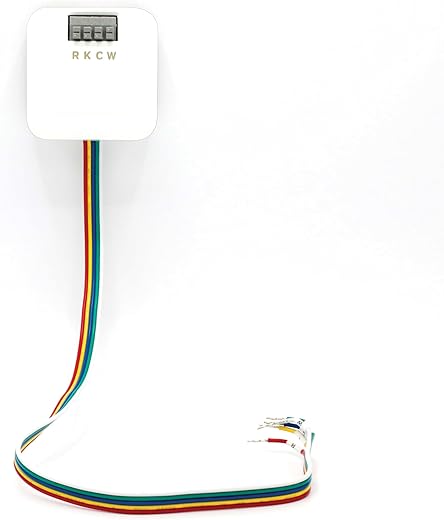
Also, shoutout to the C-Wire Adapter for Honeywell devices — handy for situations where rewiring is a pain.
Would love a printable one-page version of the flowchart for my toolbox. ?
Totally agree on the 18/5 cable — I keep a spool in the van. Quick tip: label both ends with tape so you don’t mix terminals when you crawl into the attic.
Thanks Emma — awesome to hear it worked! I’ll put a printable one-page PDF on the next update; great idea. If you want, I can share the exact multimeter checks I use before I commit to running new wire.
That’s encouraging — I’m nervous about the PEK. Emma, did you need to change any settings on the ecobee after wiring the 18/5?
I ran into a weird compatibility issue with the Amazon Smart Thermostat and Ring — the article mentioning Alexa and Ring compatibility was what drew me in. In my case the thermostat paired fine with Alexa but Ring integration kept dropping off. Followed the flowchart, checked power (no PEK needed), reseated the wires, and eventually updated the Ring skill.
Helpful overall, but I think the ‘when to call a pro’ section could include a short checklist for connectivity issues that aren’t wiring-related (like cloud account link problems).
Also check if your router has AP isolation or guest network enabled — that blocked my thermostat from talking to other smart home devices.
Thanks Priya — that’s a great addition. I’ll expand the ‘call a pro’ part to include cloud/account and app troubleshooting steps (and when it’s likely a back-end issue vs local wiring).
I had something similar — Ring tends to be flaky after firmware updates. If you see repeat drops, try unlinking/relinking the skill and checking router settings (2.4GHz vs 5GHz can matter).
Good tip Sam — I didn’t think about the 2.4/5GHz split. Thanks!
This was straightforward and pragmatic — I installed an ecobee Smart Thermostat Premium and the included SmartSensor made a big difference for my upstairs bedroom temp swing. The write-up on where to place sensors is on point (don’t put them in direct sun!).
Also, buying an extra 18/5 cable was cheap insurance — ended up needing an extra 6 feet. Highly recommend stocking a little extra wire and the C-Wire Adapter for odd installs.
I did the same — sensor placement is underrated. Put one near bedrooms, not on the vent.
Glad the SmartSensor helped, Linda! Good call on extra cable — I’ll add a short note about always buying a bit more than you think you need.
Very useful guide. Quick technical question: when would you recommend power-stealing vs installing the ecobee Power Extender Kit (PEK)? I know power stealing can cause odd behavior on some systems. Any rules of thumb in the flowchart about that?
I’ve seen power-stealing cause short-cycle fan behavior on two-stage systems. If you have a multi-stage or heat pump, don’t gamble — PEK or real C-wire.
Great question, Sara. Short answer: prefer PEK or a proper C-wire if the furnace/air handler supports it — power-stealing is a last resort for older systems that can’t provide consistent 24V. The flowchart suggests: test for stable 24V -> if low/stable consider PEK or C-wire; if unstable or droops under load, avoid power stealing. I’ll add a flow node that explicitly covers this decision and the typical symptoms of power-stealing problems.
Loved the bit about calling a pro — my DIY ego got clipped that first time ?
Flowchart = therapy for compatibility headaches.
Same here. I tried to be macho and almost fried my furnace board. Learned to call the pro sooner!
Haha, glad it saved your ego and your weekend, Miguel. We’ve all been there.
Long comment incoming — there’s a lot to love here.
First, the C-Wire Solutions section is practical and not preachy. I’ve installed a bunch of thermostats and between the C-Wire Adapter for Honeywell Smart Thermostats and the ecobee PEK, I’ve had success in different situations. The adapter is great when you can’t access the furnace easily; PEK is better when you want the thermostat to behave like it has a C-wire without pulling new cable.
I appreciated the installation best practices — the tool checklist saved me forgetting my wire stripper once (don’t laugh, it happens). The sequence and safety steps are concise but thorough; that part should be shared on forums. The “real troubleshooting paths” examples were the most useful — seeing a few real-case branches (old boiler, multi-stage heat, heat pump) helped me map to my own system.
If I were to nitpick: a short primer on identifying heat pump vs conventional systems at a glance would be helpful for absolute beginners. Otherwise, great job — very practical.
Really appreciate the detailed feedback, Zoe. Good call on adding a heat pump vs conventional quick ID guide — I’ll add that with photos and typical label clues.
Totally agree — PEK worked for me on a 2-wire setup until I finally got a proper C-wire pulled. But it depends on the thermostat model and how hungry your system is for power.
Zoe — if you want, I can send a short PDF cheat-sheet for identifying system types. I already have it from a workshop.
Thanks Ethan — good point about power draw. I’ve seen older systems struggle with power stealing.
Please share the PDF! Would save me from trawling half the internet ?
Quick note: bought that C-Wire Adapter for Honeywell Smart Thermostats because I’m lazy and didn’t want to run new wire. Installed in 20 minutes. Zero regrets. ?
ps: wiring colors at my place were a mess tho — label everything!!
Same — found 3 different blue wires used for different things in one house. Nightmare.
@Aisha omg yes. Took me 15 minutes to trace one wire lol ?
Glad it worked out, Kevin. Yeah, some installers reuse colors so labeling is a lifesaver.
Nice article. I actually bought the 18/5 18-Gauge Thermostat Wire 10-Foot Cable that you mentioned and ran it through the crawlspace. Your sequence on testing before connecting saved me from hooking red to the wrong spot.
One thing that caught me: on some boards the labeling is rubbed off — your tip to trace wires back to the terminal block was clutch. Also, consider adding a short section on using tone probes for tracing when wire labels are gone.
Thanks for sharing your checklist — I printed it and taped it inside my toolbox.
Tone probes are lifesavers. Pro tip: clip the alligator to the transformer ground when possible for a stronger signal.
Nice work, Daniel — using a tone probe is a great idea for the ‘trace when labels are gone’ scenario. I’ll add a short how-to on that tool in the next update.
@Ben good tip — I had a weak signal until I did that. Saved me from crawling under 30 feet of insulation twice ?
Solid write-up. The wiring section cleared up a misconception I had about fan triggers vs HVAC triggers. I replaced a thermostat recently and found that my G wire was tied into a weird fan relay — your flowchart’s ‘trace the wire to the furnace board’ step is golden.
One small suggestion: maybe add a small diagram for common HVAC board layouts? Not everyone can visualize what the terminals look like inside.
+1 for photos. When I first opened my furnace I had no idea what was what. A few labeled pics would’ve saved me from a panic call to my buddy.
Great point, Jordan — I’ll add a couple of common furnace board photos and callouts in the next revision. Appreciate the suggestion!