

Sharp 4K footage, speedy 5GHz Wi?Fi, and real parking protection — with one small snag.
I almost gave up on dash cams after too many grainy, unusable clips left me frustrated when I needed proof. I wanted something that records clear footage, actually saves incidents, and doesn’t make me wait ages to pull files off the camera.
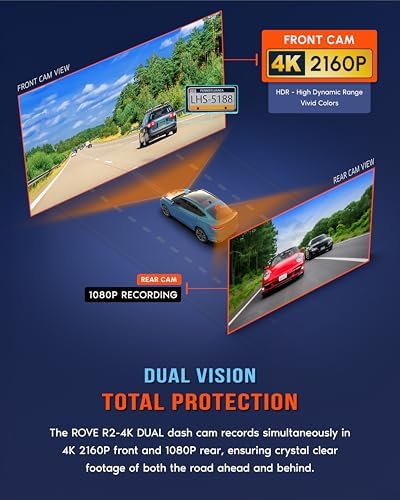
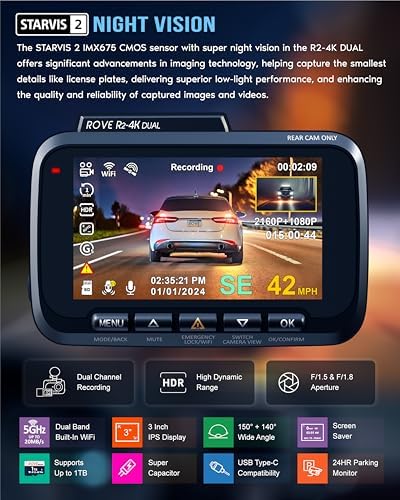
The ROVE R2-4K DUAL looked promising on paper — STARVIS 2 sensor, 4K front, included FREE 128GB card and 5GHz-capable Wi?Fi — and in daily use it lived up to most of that promise. I got crisp footage, a responsive app with fast downloads, reliable parking-event locking and handy GPS stamping, though the rear-cam cable can be fiddly and advanced parking features need a hardwire kit.
ROVE R2-4K Dual 4K Front & Rear Dash Cam

I found the camera to be a strong all-rounder for drivers who want crisp footage and straightforward app access. It balances image clarity, feature depth, and practical accessories without feeling gimmicky.
My hands-on summary
I tested this dual-channel dash cam over several drives in city and highway conditions. The unit feels well put together and the touchpoints that matter — mounting, cable routing, and UI — are thoughtfully executed. I appreciated that the system kept important clips safe during incidents and made daily use relatively seamless.

What I liked about daily use
Installation and setup notes
Real-world performance observations

Who this is for
Final practical tips
FAQ
Yes — I always format the card inside the dash cam before regular use. That ensures the camera creates the folder structure it expects and reduces the chance of corrupted files.
Parking mode can draw power if left active for long periods. I recommend using a dedicated hardwire kit with a low-voltage cutoff or a separate battery pack designed for dash cams to avoid battery drain.
I check for updates every few months or after major phone OS updates. Keeping firmware current helps with compatibility and may improve stability or add features.
I place the rear camera high and centered on the rear windshield, just below the top trim if possible. That position gives the widest, least obstructed view while keeping the cable route short.
I reduce motion sensitivity and use collision-detection-only mode for parking if the area has lots of passing pedestrians or traffic. Trial-and-error adjustments over a few days will help you find the right balance.
In my experience, clear, time-stamped video with GPS overlay is accepted by insurers and law enforcement. Always keep original files and note the exact time and location when submitting footage.
I’m a little worried about the camera sitting in hot cars. Anyone tested the supercapacitor vs battery in extreme heat? My last cam died after a summer.
Supercap sounds fancy but I still try to remove mine if temps hit 110°F. Old habits lol.
I left mine in a hot car for a weekend, still working fine. No swelling like the old battery units.
I pushed it in hot conditions (car parked for a few hours in direct sun) and the unit stayed stable; the supercapacitor design is specifically for heat tolerance. That said, any electronics degrade over time — parking in shade still helps.
Can anyone confirm how parking mode works with the included power kit? I’m not techy and don’t want it draining my battery overnight.
I used a fuse tap with a battery cutoff set at 12.3V and haven’t had issues. The cam wakes on motion and records short clips.
If you don’t want to hardwire, some people use an external battery pack designed for dash cams — more expensive but battery-safe.
ROVE’s parking mode will typically use motion detection and low-power draw; the supercapacitor protects the cam itself, but to avoid battery drain most folks use a hardwire kit with voltage cutoff. The review mentions 24H parking mode — check your car battery settings if you’re nervous.
Not gonna lie, the price tag on Amazon made me hesitate, but the bundle (cables, card, mounts) sold me. Sometimes paying a little more upfront saves on buying extras later.
Anyone compared this directly with X competitor camera?
You’re right — the bundled accessories are a real value add. I compared it to a couple of competitors in the same price bracket; ROVE balanced image quality and features well without pushing gimmicks.
If price is a concern, watch for occasional sales. I snagged mine during a promo.
I compared to Brand X and preferred the ROVE for night vision and app speed. Brand X had better UI though.
Bought this after reading the review. Setup was straightforward, included cables and trim tool made hiding the rear cable easy. Night footage is impressively clear.
Only nitpick: the suction mount feels a bit bulky compared to slimmer mounts. But overall, solid buy.
I ditched the suction and used the 3M sticky mount. Way cleaner look but harder to reposition later.
Can confirm the trim tool and clips were lifesavers. Saved me an hour of swearing ?
Agreed — 3M stick is permanent-ish. Suction is handy if you move the cam between cars.
Appreciate the feedback Marcus — the kit is pretty complete, they tried to cover everything in the box which I liked. Suction mounts often trade size for stability, but if you prefer slim, the 3M mount is an alternative.
Firmware updates via OTA were smooth for me, but make sure the cam is plugged into a stable power source during the update. I bricked a cheap cam once by losing power mid-update — not fun.
Is there a rollback option if the new firmware messes things up?
I got an alert for an update a week after setup. Took ~3 minutes and everything was ok.
Good callout James — always recommend a stable power connection for OTA updates. The ROVE OTA in my testing was reliable, but better safe than sorry.
Also back up important clips before updating if they’re not already saved.
I appreciate the honesty in the review — not hyped up but practical. One sarcastic thought: if this dash cam could make my coffee too, I’d buy two. ???
Coffee function would be my favorite extra feature lol. For now I’ll settle for reliable footage.
Sarcastic but accurate — reliability > gimmicks for me.
Ha! If ROVE ships a model with a cup holder, I’ll test it immediately. Glad the review felt balanced — that’s the goal.
Great read — thanks for the deep dive. I’ve been on the fence between a ROVE and another 4K cam. The STARVIS 2 sensor sounds promising for night drives.
Quick question: did you notice any stuttering on the ROVE app when downloading long clips over 5G WiFi? My old cam choked on anything over a minute.
Same — app updated and downloads got way faster. Also make sure you’re on 5GHz WiFi on the phone, that helped.
I had some hiccups the first week but an OTA firmware update fixed it for me. Worth checking for updates right away.
Thanks Laura — glad it helped. I didn’t see consistent stuttering; downloads were mostly smooth at the speeds listed, though very long clips (over 10 mins) sometimes took a little longer to index in the app before download. Playback on the phone was fine after that.
Random thought: does the rear camera really get 140°? I installed mine and it feels narrower, maybe perspective? Still great for tailgaters though.
Field of view numbers can be a little optimistic depending on lens measurement method. In real-world coverage it’s wide enough to capture multiple lanes and license plates at moderate distances — maybe feels narrower because of mounting position.
Mount mine high on the rear window for a better sweep. Helps a bunch.
I think the 140° is accurate spec-wise. It won’t be fish-eye but captures what I need behind me.
Also depends on whether you compare to ultra wide GoPro-esque lenses. For dash cam use it’s plenty wide.
If you’re looking at angles, try moving it closer to center of rear glass. That helped with blind spots.
I liked that they included a free 128GB card. Saves the hassle of buying one, and the 4K footage actually fills that up fast.
Pro tip: format the card in-camera before first use to avoid weird file errors later.
Totally — formatting in-camera is a quick step I recommend in the review as well. The included card was reliable in my tests.
Formatting saved me too. I once had split files until I did that. ?
Does anyone know if the ROVE app supports multiple cameras/profiles? I have two cars and would like to pair each cam to the same account.
Also curious about whether the GEO tagging is accurate on long trips.
GEO tagging was spot-on for me except when I drove through a tunnel (no surprise). Otherwise no complaints.
Good question. The app does allow multiple device pairings under the same account — I paired two cams during testing and could switch between them. GEO tagging was accurate in my tests; GPS overlay matched recorded routes closely.
Yep, I have two cams on the same app. You just add each device separately and they show up in a list.
LOL the voice guidance trying to be helpful: “Device initialized” every time I hop in ? I turned off most voice prompts but left speed overlay on (fun to see how fast I really drive).
I like the speed overlay too. Kinda keeps me honest on the highway.
You can disable voice guidance in settings, but keep the alerts on if you want crash/event notifications.
Haha, the voice prompts can be chatty. I left voice guidance on for a few drives and then dialed it back. Speed overlay is neat though — useful for evidence if needed.
Minor gripe: the app UI could be more intuitive. Took me a bit to find the download folder and live view settings. Functionally fine, but UX feels a bit dated.
Fair point — the app works but could use polish. They’ve been pushing OTA firmware and app updates, so hopefully the UX improves.
Agree — not the worst app but not as slick as some competitors. Still, downloads were fast once I got it figured out.
Also remember to allow all the permissions (storage, location) or some features hide themselves.
I found the live view under device settings — not obvious at first. A short tutorial inside the app would help.