

Which tiny black box saved my photos, movies, and peace of mind?
BACKUPS ARE NOT OPTIONAL. I learned that the hard way when a drive failed the week before a family reunion slideshow. Panic is loud. Restoring from a good NAS is blissfully quiet.
I tested four home NAS devices across speed, software, and ease of use. I focused on what actually matters: reliability for daily backups, real-world transfer speed, and how painless the recovery process is.
Top NAS Picks



Asustor Lockerstor 2 Gen2 AS6702T
I consider this one of the most flexible two-bay options for advanced home setups: excellent expandability with four M.2 slots, dual 2.5GbE, and a capable Celeron CPU. It's well suited for power users who want to run VMs, containers, surveillance, and fast local storage in one box.
Why I like this unit for advanced home setups
The AS6702T gives you a lot of flexibility in a small 2-bay footprint: native NVMe slots, dual 2.5GbE ports, and a modern Celeron CPU make it an excellent home datacenter building block. I use it where I need fast local storage plus the ability to run containers, a media server, and lightweight VMs.
Standout specs and how I use them
Caveats and practical security tips
In my testing I was impressed by raw throughput and the options for caching, but I also noted a clear need for secure remote access. Several users report ransomware attempts linked to exposed remote services; I strongly recommend disabling vendor quick-access services, using a VPN for remote access, enabling a firewall, and running the device behind a router with strict port rules. Also plan to upgrade the RAM if you intend to host multiple containers or VMs.
For home power users who want expandability and speed, this is one of the most capable two-bay choices. My practical approach is to populate one NVMe as an L2 read cache (or small write cache with UPS protection), set up RAID 1 for the HDDs, and keep an external backup strategy for critical data.
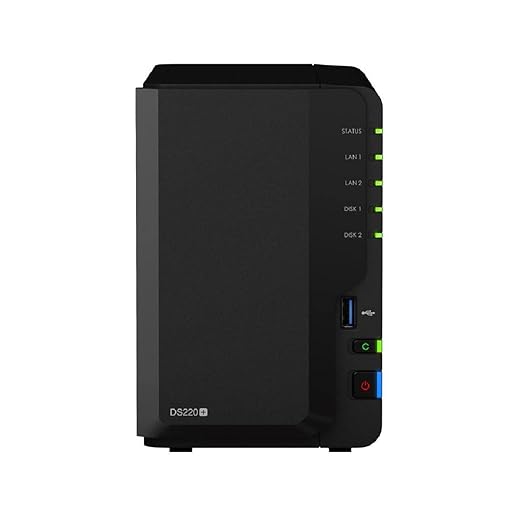
Synology DS220+ 2-Bay NAS Server
I found this unit to be a balanced combination of reliable hardware and an outstanding software ecosystem that simplifies backups, syncing, and light multimedia tasks. It handles typical home backup roles very well, but you should be mindful of network and transcoding limits on 1GbE and the Celeron CPU.
What I like about it
I use this model when I want a straightforward but capable home NAS that makes backups and file sharing painless. The DiskStation Manager (DSM) software is the real differentiator: it bundles mature backup apps, snapshot tools, and a friendly web UI that makes routine tasks easy even if you're not a sysadmin.
Key features I rely on
Limitations and practical notes
I noticed the device is limited by its 1GbE ports for bulk transfers; if you regularly move large datasets you will hit the network ceiling before CPU. The CPU is also fine for direct-play and light transcoding, but heavy Plex/Emby transcoding will struggle. Drives aren't always preinstalled depending on the package, so budget for drives and consider modern NAS-grade HDDs (WD Red/Seagate IronWolf).
If you plan on more demanding tasks, I recommend upgrading network or using this as a reliable backup and file server, while offloading heavy transcoding to another device.
Real-world use and recommendations
I use it primarily for multi-device backups, photo and document centralization, and occasional media streaming. For that mix it shines: snapshot-based protection and scheduled Hyper Backup jobs give me peace of mind. My practical tips: enable Btrfs where supported, use Snapshot Replication for critical folders, keep DSM updated, and pair it with a UPS to protect against abrupt power loss.
TerraMaster F2-425 2-Bay 2.5GbE NAS
I found this to be a compelling balance of price and capability: modern 2.5GbE networking, a quad-core Intel CPU, and an approachable OS. It’s especially attractive if you want faster local transfer speeds and a low-cost Plex or file server for home use.
What stands out to me
The TerraMaster F2-425 stands out because it brings 2.5GbE networking and an x86 quad-core CPU to a very affordable 2-bay chassis. In practice that means noticeably faster local file transfers for multi-user households and solid performance for media streaming and backups.
Practical feature summary
Real-world limitations and tips
I observed that while the hardware spec sheet looks good, the device is not a substitute for higher-end NAS boxes when it comes to sustained heavy-duty transcoding or enterprise-grade features. The app library is improving but still trails Synology. I recommend upgrading RAM if you plan to run containers or multiple services concurrently, and choose NAS-optimized drives for 24/7 reliability.
If you want a budget-friendly NAS that improves local network speed and is easy to set up for backups and media, this unit is an attractive option. For large Plex transcoding loads, pair it with a separate transcode-capable machine.
Western Digital My Cloud EX2 Ultra
I appreciate how easy this unit is to get running and how competitively priced it is for raw TB-per-dollar value. It’s a sensible choice for users who want an uncomplicated, always-on network share and RAID redundancy without the overhead of advanced NAS ecosystems.
Why I picked this one for value
This EX2 Ultra model is built around simplicity: plug it in, configure a RAID, and you have centralized storage accessible from all devices on the network. For someone who wants a reliable, low-fuss backup target and large capacity without deep configuration, this is a pragmatic choice.
Core capabilities
Where it feels dated and what that means
I noticed the EX2 Ultra's software and hardware are from an earlier generation: the app ecosystem and advanced snapshot/restore features aren’t as polished as the newer DSM/QTS platforms. Some users report intermittent Time Machine problems or firmware-related access issues, so expect occasional troubleshooting or the need to apply updates.
If you value simplicity and maximizing storage per dollar, this is a good pick. If you need the latest feature set, container support, or faster networking, consider a newer model from vendors like Synology or Asustor.
Practical usage tips
I recommend using RAID 1 if you want redundancy, scheduling regular offsite backups (cloud or external drive), and keeping firmware current. For Time Machine users, test the Mac backup process after setup and be prepared to consult WD community resources if you encounter hiccups.
Final Thoughts
I recommend two clear winners depending on how deep you want to go.
(If budget and raw local speed are your top priorities, the TerraMaster F2-425 is a solid, cost-effective alternative; for a no-frills, easy-to-run unit, the WD My Cloud EX2 Ultra remains a sensible entry-level choice.)
I bought a My Cloud years ago and it was fine until I tried to move large archives — felt like watching paint dry. ?
I know the EX2 Ultra is entry-level, but for large file restores is it going to be painfully slow compared to the 2.5GbE boxes?
Agree — for occasional restores it’s fine, but don’t expect warp speed. If you do one big migration though, you can always pull the drives and restore locally if needed. ?
Michael — yes, the EX2 Ultra is limited by its network and internal hardware compared to 2.5GbE devices like the Terramaster or Asustor with dual 2.5GbE. For big bulk restores, you’ll see a noticeable difference. If you frequently move TBs of data, consider a 2.5GbE-capable unit.
Looking for advice: I want a NAS for family backups + a little Plex streaming to two devices. Budget isn’t huge but I want reliability. Which would you pick: Synology DS220+ (with the included 4TB), TERRAMASTER F2-425 (diskless), or ASUSTOR AS6702T (diskless but pricier)?
I value easy backups and not having to babysit the device.
If “easy backups” and minimal babysitting are top priorities, the Synology DS220+ (especially with included 4TB) is the safe, user-friendly choice — DSM handles backups and client apps well. If you want better local transfer speeds or plan to expand into heavier media use later, the TERRAMASTER is a good budget performance pick. Asustor is great if you expect to run VMs/containers or need the NVMe slots, but it’s overkill for simple family backups.
I’ll chime in — for Plex to two devices you don’t need insane CPU. DS220+ is easiest. I had one for family backups and it just worked for years. If price is really tight, get the F2-425 and add drives later.
Also check whether the 4TB included model is user-replaceable or pre-configured; if you want RAID, buy two drives or ensure the bundle supports RAID1. Otherwise good choices all around depending on future plans.
Thanks for this — I found the expert ratings helpful.
I’ve been using a Synology DS218+ (older model) and the DSM ecosystem is addicting. Backups, Moments (well, Synology Photos now), Cloud Sync — it’s all very smooth.
But omg the Asustor specs are tempting: 4x M.2 NVMe slots? That’s sexy for cache and scratch space. ?
Curious if anyone uses the WD My Cloud EX2 Ultra just for dumb backups (no Plex, no VMs) — is it still worth it or does it feel too dated?
Synology hook here — DSM just makes life easier. But if you want to experiment with cache/VMs later, Asustor looks more future-proof. Depends on whether you want simplicity or headroom to tinker.
Emily — the WD EX2 Ultra is still a solid, simple option for straightforward backups and shares. If your needs are “set it and forget it” with RAID redundancy and affordable TB-per-dollar, it’s a sensible choice. But it won’t match DSM’s advanced services or Asustor/Terramaster performance for heavier tasks.
I use the EX2 Ultra as an offsite-like backup (rotated between locations). Super easy to set up and cheap per TB. If you need advanced apps, skip it; if you need reliable shares and RAID, it’s great.
FWIW I had the EX2 for backups and it never let me down for basic file backups. No flashy features but very low maintenance. tiny downside: UI feels old compared to DSM/TOS.
Nice write-up. I’m torn between the TERRAMASTER F2-425 and the Synology DS220+. Price-wise F2-425 looks better and 2.5GbE is tempting, but how much of a difference is Synology’s DSM in day-to-day use? Is the tradeoff worth it?
Good question — DSM is probably the smoothest, most polished experience for backups/syncing and has a richer app ecosystem. The TERRAMASTER gives more raw network speed for local transfers (2.5GbE) and a better price-to-hardware ratio. If you value UI/backup features and long-term app support, go Synology; if you want performance per dollar and 2.5GbE, Terramaster is a solid pick.
I picked the F2-425 last year for the 2.5GbE and haven’t regretted it. DSM is nicer, but TOS (Terramaster OS) does the job for Plex and file shares. If you’re not a tech-averse person, F2-425 is a good bang for the buck.
Great roundup — thanks! I’m leaning toward the Asustor Lockerstor AS6702T for a small home lab.
I like that it has 4x M.2 NVMe slots for cache and dual 2.5GbE for faster transfers.
My questions:
1) Has anyone used it with mixed-size NVMe drives for cache?
2) Any noise/heat issues when running containers + Plex?
Also curious about drive compatibility — I’ve got a couple of older 8TB drives lying around. Would RAID1 be the best bet for redundancy and ease of recovery?
Minor tip: if you plan to run VMs, bump the RAM if possible (4GB is ok but 8GB+ is nicer). Also check the Asustor compatibility list for weird drive models — some green/SMR drives act strange in RAID rebuilds.
Hi Sarah — glad it helped! The Lockerstor is flexible with NVMe cache, but I’d match sizes if you want predictable cache behavior. RAID1 on two bay units is the safest simple approach for redundancy. For noise/heat: with decent airflow and SSD cache it stays reasonable, but heavier VM/container loads will warm it up.
I run one with mixed NVMe (different sizes) — it worked fine for me as cache, but you don’t get perfect efficiency. For drives, your old 8TBs should work fine in RAID1. If you want faster rebuilds, go for newer drives with similar RPM/age if possible.