

Affordable 4K, waterproof, and loaded with mounts — just bring spare batteries and be patient with the app.
I hate hauling bulky, expensive camera gear when I travel, but I still want crisp footage and a waterproof rig that won’t break the bank. I bought the AKASO EK7000 because it promises 4K capture, a waterproof housing to ~131 ft, a wrist remote, lots of mounts, and external mic support — all for under sixty bucks.
After using it on hikes and in the water, I found it strikes a surprising balance between features and price: solid 4K and very good 1080p, plenty of accessories out of the box, and handy hands-free controls. It isn’t perfect — battery life is limited and the companion app can be slow — but for hobbyists and travelers who want rugged versatility without a big investment, it’s a sensible choice.
AKASO EK7000 4K WiFi Waterproof Action Camera

I find this camera gives a striking balance of features and price — you get 4K capture, waterproofing, and lots of mounts without a big investment. It’s ideal for hobbyists and travelers who want rugged versatility, though power management and the mobile app can be frustrating at times.
My quick take
I picked up this model because I wanted an inexpensive, packable action camera I could use for travel, snorkeling and bike rides without worrying about scratching an expensive unit. In everyday use it delivers surprisingly usable footage, simple menus and a handful of pro?style options (timelapse, burst photo, loop recording).


Key features that matter to me
I appreciated the physical controls and the included waterproof housing that actually feels solid in surf and pool use. The wrist remote workflow is convenient when you’re biking or skiing and don’t want to take your hands off the controls. The camera supports an external microphone (adapter required) which is a nice touch for vlogging.
Practical performance notes (real-world)
The 4K mode is sharp in good light but softens in low light; for motion I usually default to 1080p60 for smoother results. EIS helps but you’ll still see micro?jitters on very bumpy rides. Battery life is modest — expect roughly 60–90 minutes per battery depending on resolution, so plan on swapping batteries for long outings.
| Mode | Typical use | My verdict |
|---|---|---|
| 4K30 | Scenic shots, bright daylight | Great detail but heavy files |
| 1080p60 | Action sports, fast motion | Best smoothness and playback |
| Timelapse/Burst | Landscapes, action sequences | Reliable and easy to set up |

Tips I follow when shooting
Overall I found this camera to be a practical, budget?minded tool that lets me capture adventures without worrying about gear cost. It won’t fully replace a premium action camera for professional use, but for travel, snorkeling, biking and casual vlogging it’s hard to beat for the price.
FAQ
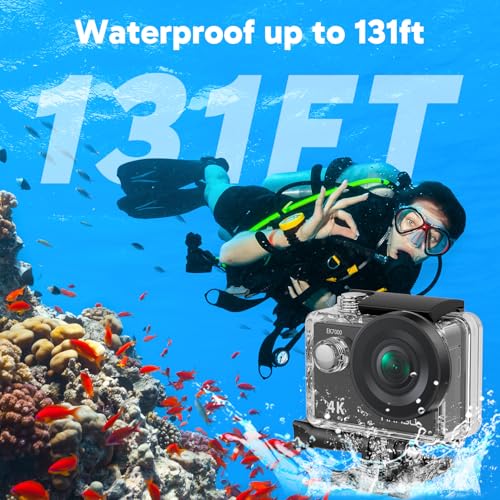
You can use it underwater with the included waterproof case down to the stated depth (around 131 ft / 40 m). For scuba diving I recommend testing seals and O?rings before each use, rinsing the case in fresh water after dives, and adding an anti?fog insert to the housing to prevent condensation at depth.
4K delivers more detail for scenic footage in good light, but it creates large files and is recorded at 30fps here. For fast action I prefer 1080p60 because the higher framerate gives smoother motion and typically looks better for sports and helmet cams.
Use an external microphone through the optional mic adapter and avoid putting the camera inside the waterproof housing when possible (or use a housing designed for external mic access). Wind noise is the most common issue — a small furry wind muff on the mic helps outdoors.
Bring at least two spare batteries and keep them warm in a pocket if you’re shooting in cold weather; swapping batteries is the easiest way to double or triple your runtime. Turn off Wi?Fi and limit LCD usage to extend each battery charge.
In my experience the app works for quick previews and small transfers, but it can be slow and occasionally unstable when downloading large clips. For bulk transfers I recommend removing the microSD card and copying files directly to a laptop with an SD adapter.
The EK7000 is compatible with many GoPro?style mounts included in the kit because the accessory ecosystem uses similar mounting plates and adapters. Always check your mount connection and secure the quick?release before any high?impact activity.
Anyone edit 4K from this camera on a budget laptop? File sizes are big and my laptop chokes. Looking for workflow tips — proxy editing maybe?
If possible, shoot at 1080 for easier editing and still decent results — especially if your final output is social media.
Proxy editing is the best approach. Create lower-resolution proxies for the timeline, edit, then switch back to the original 4K for export. VLC and HandBrake can transcode files if your NLE doesn’t handle it well.
I use DaVinci Resolve with proxies and it works fine on a mid-range machine. Also, offload and store raw files on an external HDD to save space.
Long post incoming — sorry! ?
I took this camera snorkeling (in the included housing) and the colors looked surprisingly nice for such an inexpensive camera.
Battery life: about 45-55 minutes per battery when recording 4K/30fps with occasional clips. Bring both batteries and a charger.
App experience: clunky and sometimes drops connection, so I usually just set things up and shoot without the app.
Overall: great for casual underwater shots and travel, but don’t expect pro-level dynamic range or low-light performance.
Thanks for sharing specifics! How deep did you go? I’ve read mixed reports about housing seals, so I’m curious.
Thanks for the detailed rundown, Sophia — very helpful. The app can be hit-or-miss; many readers find the same. Setting things up manually tends to be more reliable.
App drops connection for me too. Any tips on maintaining a steady connection? Or is it just better to avoid the app entirely?
App rant incoming: the app kept crashing on my phone, and sometimes it wouldn’t transfer files reliably. Fixed it by formatting the SD card in-camera and reinstalling the app.
Other tips: use high-quality microSD (U3) and keep spare batteries. Video quality is very good for vlogs and travel clips, but indoor low-light is noisy.
Hope this helps others — formatting the card was a game changer for me.
Great troubleshooting steps, Olivia — formatting SD in-camera is a common fix we recommend in the review as well. Thanks for sharing.
SanDisk Extreme or Samsung EVO Select both worked fine for me. U3/V30 cards are the key.
What brand of microSD did you use? I’m debating between SanDisk and Samsung for 4K recording reliability.
Agree with the card recommendations. We test with U3-class cards and suggest them in the article for consistent 4K recording.
Formatting in-camera fixed random freezes for me too. Also, use a fast reader to transfer files — the app is slow.
Short and simple: remote control works great, battery life is average but two batteries help a lot. Happy with the purchase. ?
Remote + tripod = instant time-lapse setup. Cheap thrills, big results.
Agreed. The remote saved me a few times when I couldn’t reach the camera to start recording.
Thanks for the concise review, Chloe. The remote is a nice little perk for group shots and mounting.
Okay, who would’ve thought a $53 camera could make me feel like a low-budget adventurer? ?
But seriously: I’m a bit worried about durability. Dropped mine once (with case) and it kept recording, but the case got a hairline scratch. Also, customer support responsiveness seems hit-or-miss from what I’ve read.
If you want a ‘throw-in-your-bag’ camera that you won’t cry over if it gets banged up, this fits the bill.
Also check the return window on Amazon. I had an issue and returned it within two weeks with no hassle.
Tip: get a simple protective sleeve for transport. Saved me from scratches more than once.
Totally relatable — many buyers choose this model for that exact reason. Regarding support, issues vary by seller/retailer; Amazon returns tend to be straightforward if you have a problem.
I did the same test (drop onto sand from waist height). Functioned fine after a rinse. Not indestructible, but hardy.
Bought this for hiking videos. Lightweight, comes with a bunch of mounts (pretty surprising), and two batteries included which is nice.
Not perfect — the menu feels a bit old school and the app is shaky — but if you want a cheap way to get into action cams, this is a good start.
Glad the accessories were useful for you. We noted the same in the review — good starter kit for new users.
Which mount did you like most for hiking? Chest or head?
Chest mount for less wobble, head mount for POV thrills. Depends on your style ?
A simple pole (selfie stick) with a small tripod adapter works great for scenic panning without too much shake.
I used this camera for some coastal surfing clips. The housing handled the 131FT rating just fine (I didn’t go that deep, of course). 4K/30 is buttery in daylight but get ready for grain at dusk. Also the 4x zoom is purely digital — better to shoot wide and crop.
If you plan heavy editing, be mindful of file sizes and battery swaps.
Rinse with fresh water after the session and dry well. Also store with silica packs if you won’t use it for a while.
Nice! Any tips on protecting the lens from salt spray? I always worry about long-term corrosion.
Thanks for sharing your surf test, Ethan. The low-light noise is a known limitation — shooting in flat color and doing light grading helps retain detail.
For $53 I wasn’t expecting much, but this review matches my experience — solid 4K daytime shots and the waterproof case is actually decent. Bought it for a trip and got way more than I paid for.
Only gripe: battery life drains faster than the review hints. Still, for hobbyists and travel it’s a steal.
Nice! I had a similar surprise. Pro tip: keep the firmware updated — it helped reduce random reboots for me.
Glad it worked out for you, Emma. Yes — battery management is one of the trade-offs. Carrying a spare battery or an external power bank helps on longer outings.
Did you use the EIS a lot? I’m curious if stabilization made a noticeable difference on handheld shots.
Does anyone know if the EK7000 supports an external mic natively or do I need an adapter/hack? Planning to use it for short interviews.
It supports external mics but typically requires the accessory adapter that provides a 3.5mm jack. If you want to maintain waterproofing you’ll need a separate external recorder or a special setup — most people use the external mic for dry scenarios.
If interviews are your main use, consider a cheap audio recorder synced in post — often cleaner than the onboard mic even with an adapter.
I used a small lav with an adapter. Works well but yes — not waterproof while connected unless you have a sealed housing with a mic pass-through.
I was skeptical at $53 — thought it was one of those knockoffs that film in potato quality. Turns out: nope, actually useful. Zoom is digital so don’t expect optical magic, but hey, it records real 4K. Wild times.
Sarcasm aside, for the price it’s impressive.
Ha — I had the same hesitation. Digital zoom will degrade quality, but the base 4K is usable. Thanks for the laugh!
Totally — digital zoom is only for convenience, not detail rescue. Use wide and crop in post for better results.
Quick question for those who’ve used it: how effective is the EIS in real-world situations? And does the external mic jack actually improve audio, or is the onboard mic fine for casual vlogs?
Agree with admin. EIS is fine for walking and moderate movement. For high-speed stuff, stabilization can’t do miracles.
I use a small lav mic with an adapter — audio clarity jumps. Just be mindful of the extra setup and lose the waterproofing if you plug it in.
EIS is decent if you’re not doing extreme action. For biking I still used a chest mount to reduce shake. External mic? Yes — big improvement. Onboard mic = meh.
EIS helps, especially at 1080p — it’s not GoPro-level but it’s respectable for casual use. The camera supports an external mic via the accessory/adapter and that definitely improves audio quality if you need clearer dialogue or wind reduction.